
Staying Connected in Iceland: Your Essential Guide to Mobile Connectivity
In our hyper-connected world, the ability to stay online while traveling is both a blessing and, at times, a slight curse. For food and travel bloggers like us, the desire to remain connected while exploring new destinations like Iceland is particularly strong. While some travelers passionately advocate for a complete digital detox on vacation, others, including my partner Jason and I, find immense value in staying connected. This doesn’t mean we’re chained to work emails or business calls – far from it. For professional matters, I diligently set up an out-of-office message and only respond to pressing emails or comments once we’ve returned to our hotel for the evening, or simply wait until after the trip concludes.
For many adventurers, having reliable internet access means seamless navigation, instant access to information, sharing breathtaking moments with loved ones, and ensuring safety in unfamiliar surroundings. If you’re one of those who appreciate the convenience and peace of mind that comes with dependable mobile connectivity while traveling, then this comprehensive guide on how to stay connected in Iceland is tailor-made for you!
Why Staying Connected Matters for Modern Travelers
The debate between disconnecting entirely and staying connected on vacation is ongoing, but for a growing number of travelers, especially those venturing to remote or unfamiliar locations, connectivity is more than just a luxury—it’s a practical necessity. Here’s why it’s so important:
- Navigation and Exploration: Google Maps, Waze, and other navigation apps are invaluable for exploring Iceland’s vast landscapes, finding hidden gems, or simply getting from your accommodation to the next attraction. Having real-time GPS makes self-driving tours infinitely easier.
- Safety and Emergencies: In any travel scenario, especially in a country known for its dramatic and sometimes unpredictable weather, the ability to make a call or access emergency services is paramount. Staying connected provides a crucial safety net.
- Information and Research: Need to check opening hours for a museum, find the best local restaurant, or quickly translate a menu? Instant access to information can significantly enhance your travel experience.
- Sharing Experiences: For many, sharing their journey with friends and family on social media or through messaging apps is a vital part of the travel experience. High-speed data allows for immediate photo and video uploads.
- Booking and Planning: Last-minute changes to itineraries, booking tours, or confirming reservations often require internet access, ensuring your travel plans run smoothly.
Understanding Your Connectivity Options Abroad
Before diving into the specifics for Iceland, it’s crucial to understand the various options available for international mobile connectivity. In the past, I relied on portable Wi-Fi devices like TEP Wireless. While these devices offered a reliable solution for internet access, they are often significantly more expensive than purchasing a local SIM card. This time around, having an unlocked iPhone made all the difference, opening up more cost-effective possibilities.
The Golden Rule: An Unlocked Device is Key
Please note: The strategies discussed below are primarily applicable if you have an unlocked mobile device. This means your wireless carrier has released the device from any network restrictions, allowing it to accept a SIM card from any provider worldwide. If your phone is still locked to your home carrier, these methods may not work, and you might need to contact your carrier to unlock it before your trip.
Beware of Carrier International Data Plans
Whatever you do, absolutely avoid purchasing your home carrier’s international data plan. In our experience, these plans are often a massive rip-off. They are exorbitantly priced, typically offer very limited data allowances, and often come with notoriously poor service quality. We made this mistake once for a trip to Turks and Caicos, and the experience was truly awful – unreliable service and a hefty bill for minimal usage. Instead, your best bet for cost-effective and reliable connectivity is almost always to obtain a local SIM card in your destination country.
Choosing the Right Local Carrier in Iceland
When planning your trip to Iceland, a little research into the local mobile carriers can go a long way. Identifying the largest and most reliable provider ensures you’ll have the best coverage, especially vital in a country with vast, sparsely populated areas. For Iceland, Siminn stands out as the premier choice. It is the largest mobile network operator in the country, boasting the most extensive coverage, which is crucial for venturing outside the capital region.
Why Siminn?
- Extensive Coverage: Siminn offers the widest network coverage across Iceland, reaching most populated areas and even many remote tourist spots. This is essential for reliable GPS navigation and emergency communication.
- Ease of Acquisition: Getting a Siminn SIM card is incredibly straightforward, especially right after you land at Keflavík International Airport (KEF).
- Competitive Pricing: Their prepaid plans offer excellent value for money, allowing you to manage your data usage without unexpected costs.
Getting Your Siminn SIM Card at Keflavík Airport (KEF)
The process of acquiring your Siminn SIM card upon arrival at Keflavík Airport is remarkably simple and designed for the convenience of travelers. Here’s a step-by-step guide to ensure a smooth setup:
- Collect Your Luggage: After disembarking your flight, proceed to baggage claim as usual to collect your bags.
- Ignore the Duty-Free Hype (for now): You might notice duty-free shops within the baggage claim area or signs advertising various cell phone companies. Resist the temptation to stop here. Your destination for the SIM card is just beyond this area.
- Exit to the Arrivals Hall: Once you have your luggage, simply exit the baggage claim area into the main arrivals hall.
- Locate the 24/7 Store: As you emerge into the arrivals area, look to your right. You should spot a convenient 24/7 store. This is your destination.
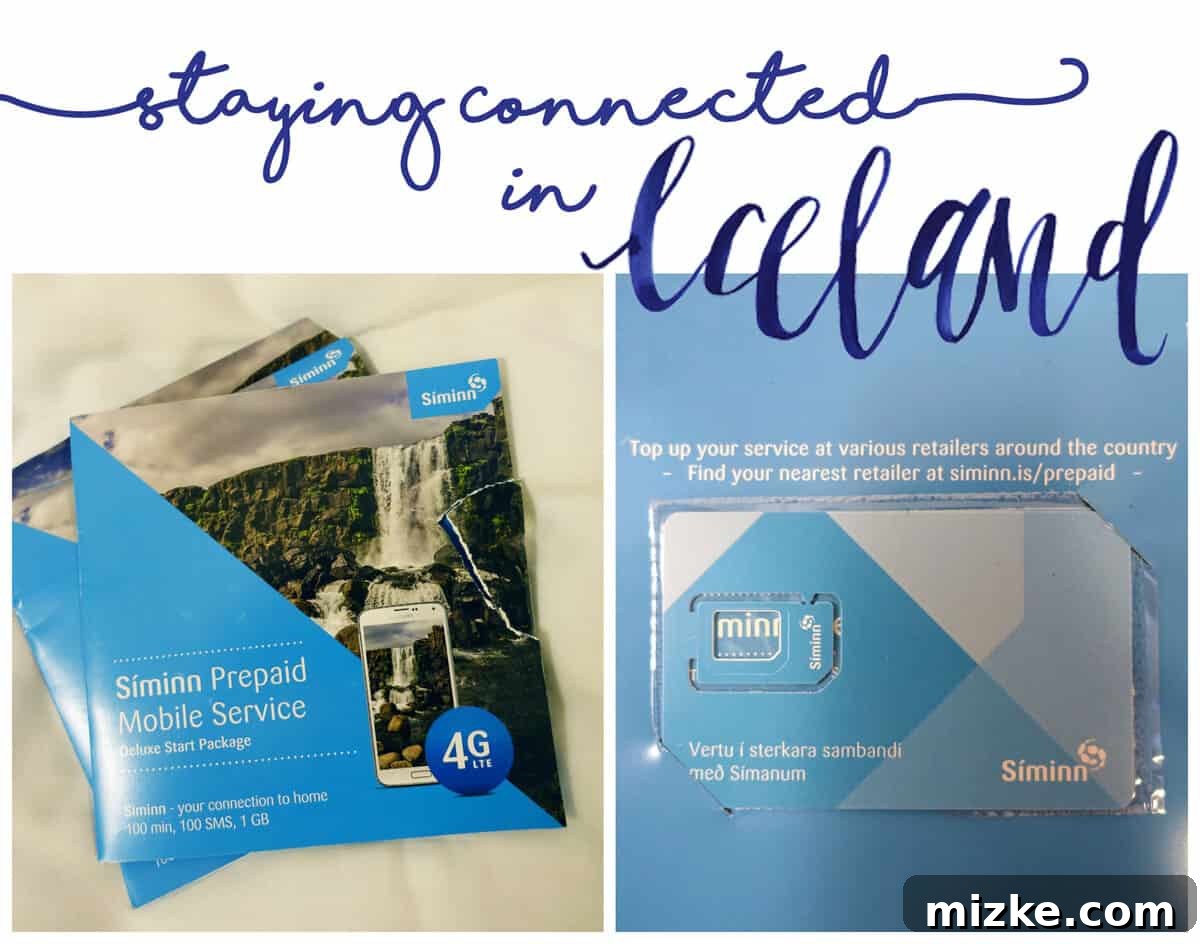
- Request a Siminn SIM Card: Enter the store and confidently ask for a “Siminn SIM card.” The staff are well-acquainted with this request from tourists and will know exactly what you need.
- Purchase and Collect: You will pay for the SIM card (major credit cards are accepted, but having some Icelandic Krona for small purchases can be handy). You’ll receive a package containing your new Siminn SIM card. The initial cost is minimal, typically covering the SIM card itself and a small amount of starting credit, which you’ll top up later.
Activating Your Siminn SIM Card: A Quick Guide
Once you have your Siminn SIM card package in hand, the next step is to get it installed and activated in your phone. This process is generally quick and hassle-free:
- Locate Your Phone’s SIM Tray: Most modern smartphones use a nano SIM card. You’ll typically find the SIM tray on the side of your phone. Use the small SIM ejector tool (often included with new phones, or sometimes provided by the SIM vendor) to open the tray.
- Swap Your SIM Cards: Carefully remove your original SIM card from its tray. DO NOT THROW YOUR ORIGINAL SIM CARD AWAY! You will need it to switch back to your home network upon your return. Keep it in a safe place, such as a dedicated SIM card holder or a small compartment in your wallet.
- Insert the Siminn SIM: Place the new Siminn nano SIM card into the tray, ensuring it’s correctly oriented. Reinsert the tray firmly back into your phone.
- Initial Activation: If your phone is indeed unlocked (which it absolutely needs to be for this to work effectively), it should automatically detect the new SIM card and attempt to connect to the Siminn network. You might see “Siminn” or “ICE Mobile” displayed as your network provider in the status bar.
- Troubleshooting Tip (If Needed): While activation is usually seamless, sometimes minor hiccups occur. For instance, my partner Jason once encountered an issue where his phone showed network service but couldn’t access data. In such cases, don’t panic and certainly don’t reset your entire phone! The fix is often simple:
- Go to your phone’s Settings.
- Navigate to General > Transfer or Reset iPhone > Reset > Reset Network Settings (for iPhone) or Settings > System > Reset options > Reset Wi-Fi, mobile & Bluetooth (for Android).
- Confirm the reset. Your phone will restart. This process only clears your network-related settings (Wi-Fi passwords, Bluetooth pairings) and often resolves connectivity issues without affecting your personal data.
Once your phone restarts, it should hopefully connect to the Siminn network with full data capabilities.
Topping Up Your Data: Maximize Your Iceland Adventure
With your Siminn SIM card installed and active, the final step is to top up your data balance. This is where you customize your plan to fit your travel needs without paying for unnecessary services.
Purchasing Data Online
The most convenient way to add data is through Siminn’s official website:
- Visit Siminn’s Website: Once you have basic service (even if just enough to load a webpage), navigate to Siminn’s top-up portal. Make sure the page is set to English for ease of use.
- Select Your Data Package: Look for the section offering data top-ups. You’ll typically find options ranging from smaller bundles to larger packages. For most travelers, especially those relying on GPS, social media, and occasional browsing, a 5GB data package is an excellent starting point for a week or more of travel. This amount is usually represented by a distinctive PINK data globe icon on their portal.
- No Need for Voice Calls: You do not need to purchase voice minutes. In today’s world, free calling and messaging apps like WhatsApp, Viber, Skype, and Facebook Messenger allow you to make calls and send messages over data, making traditional voice plans largely obsolete for international travelers.
- Complete Payment: Follow the on-screen instructions to complete your purchase using a credit card.
Cost-Effectiveness and Usage Tips
A 5GB data plan typically costs around $18 USD, providing excellent value for your entire stay in Iceland. This generous allowance is usually more than sufficient for all your social media sharing, navigation needs, and general internet browsing throughout your trip. Here are some tips for managing your data:
- Monitor Usage: Most phones have built-in data usage monitors in their settings, allowing you to keep an eye on how much data you’re consuming.
- Wi-Fi Whenever Possible: Take advantage of free Wi-Fi available at your accommodation, restaurants, and cafes to conserve your mobile data for when you truly need it.
- Download Offline Maps: Before heading out, download offline maps of Iceland using Google Maps or similar applications. This can significantly reduce your data consumption, especially in areas with weaker signals.
- Stream with Caution: Video streaming and large file downloads consume data rapidly. Save these activities for when you have access to Wi-Fi.
Final Thoughts on Seamless Travel in Iceland
By following these steps, you’ll be able to enjoy a seamless and stress-free mobile experience in Iceland. Staying connected responsibly allows you to fully immerse yourself in the country’s breathtaking beauty while having the peace of mind that comes with reliable communication and access to information. From navigating the Golden Circle to sharing stunning photos of the Northern Lights, your Siminn SIM card will be an invaluable companion on your Icelandic adventure. Happy travels and enjoy every connected moment!